
DA2 wiki has finally been built. This was a bit more challenging than I hoped it would be. It will probably require a lot of revisions over the coming months.
DA2 wiki has finally been built. This was a bit more challenging than I hoped it would be. It will probably require a lot of revisions over the coming months.
Thought I’d give the ol’ website a refresh. The biggest change, other than it looking and working better, is the DA1 wiki is finally finished. It finally provides a complete guide to the game and start-to-finish walkthrough. This was my original intent for the wiki, never realized until now. For those familiar with the game, you’ll notice the graphics for DA1 don’t quite match what you remember. That’s because DA1 is a few weeks out from a complete overhaul and the DA1 wiki is a little ahead of the release schedule. More on that another day.

Just a quick update this time to fix a very important bug. Like with any classic role playing game, the more you walk along in a dungeon, the more likely you are to be attacked. To make sure the process isn’t completely random, the first few steps are free, then each additional step increases the odds of a random battle. In DA2, these steps are measured in pixels. Well, with the old, clunky DirectX 7 version of DA2, a step was measured in multiple pixels to improve game speed. Multiple pixel stepping is no longer required with SDL, and apparently this broke my old random battle code. You could walk the entire game without a single random battle. That’s no fun. Needless to say, this was the bug that forced me to release Alpha 11 just three days after the last release. This will teach me to playtest inside a dungeon instead of in a town where battles do not occur.
In the short interim, I was able to fix the scrolling color issues. Not elegantly, but that’s life. Briefly, back when DA2 was just 256 colors, I could take some of those colors and rotate them in a sequence from dark to light. This gave magic items in the game the effect of glowing and pulsating with an aura. Just to remind you that magic items are cooler than regular items, right? Now that everything is in true color, there are no color palettes to rotate. Locking textures and hunting for pixels to change seems really dumb to me. I also tried a lot of different blend modes and masks, but this didn’t quite have the desired effect. In the end, I just duplicated the bitmaps for all the items in question, bumping the appropriate pixels in each, and now magic items are a series of 8 sprites that animate during the game. Simple right? I never would have dared this a few decades ago with QuickBasic; memory was too precious then. Funny how easy it is to dispose of now. All the new sprites I added are probably only a fraction of a high-res texture in a 3D game. And so DA2 continues trudging on, bringing the 80’s to modern gaming.
Several months ago, I decided to take a break from Dark Ages: The Continents to work on the sequel. Specifically, I decided to finally port the
game to SDL for the graphics library. This is technically the third port for the game. The most recent one, to version 2.0 alpha 1 through 9,
was already dated. It still used 2D software rendering and many of the functions no longer behaved correctly, whether this was a video driver
issue or OS issue.
So I bite the bullet and begin the port. It is surprisingly easy. Swap out DirectX (7, I think…ick…), swap in SDL 2.0, then see which functions
break. Ninety percent of the time the broken function was just a rendering function. A simple find and replace fixed those. Keyboard and mouse
inputs were easy to wrap. Even making configurable screen modes and updating to hardware rendering and surfaces instead of textures wasn’t too tricky.
In all, it was probably just a month of off-and-on work, then several months of life happening, and then finishing touches these last few days. Voila!

Dark Ages II: Engel, leaner, meaner, and more portable. It even works in Linux for those bold enough to try compiling from the source, although with a few glitches I’m choosing to ignore at the moment. Overall DA2 will work better (or at all) on most computers now. The sacrifice is in a few cosmetic issues, e.g. a few mouse cursor issues. Most noticeable, perhaps, is in moving from 256 color screen modes to true color. True color gives me more compatibility, and allows for a few simple effects like translucent dialog windows. But it broke the palette effects. Original DA2, back to the very first version, used 32 color indexes for effects. Those effects included swapping the colors each screen refresh, allowing texture colors to change, glow, or sparkle. Without a palette, those pixels are no longer magical in the game. Oh well, time to get creative…
In any case, enjoy alpha 10. In summary, lots of big changes, and the end result is a few more things broken! Yay! Hopefully not too many new bugs were introduced in the port, but I’m sure you’ll all let me know. Source code is now available for Linux users or anyone who wants to see all the wrong things I did.

Ironically, Dark Ages has always been a console style game that required a keyboard and did not support a gamepad. It was very unconsole-like
in that regard. At the time, this was mostly a limitation of trying to support peripherals the average PC user didn’t have in an outdated and
abandoned programming language. I wasn’t going to waste my time doing that. Thankfully, the development libraries available to game
programmers today are much more advanced, to the point that it is probably easier to support gamepads for a basic tile RPG like this one.
When I started the port of DA1, I did it more or less directly; make the gameplay identical to the original. However, under the hood the code
is a bit more dynamic (although still very basic by game design standards - not what I would do when building a new game from scratch). Particularly,
I designed it for different user inputs. With just a few basic system checks and some additional event handlers, gamepads are detected and operate
seamlessly with the keyboard. Mouse will follow shortly, although I wouldn’t recommend it, and that is a topic for a different time. Each action
in the game has a key mapped to it. Simply mapping the gamepad buttons duplicates all functionality. If you have a gamepad, use it at any time.
If you prefer your keyboard, just ignore your gamepad. Both work simultaneously.
One small caveat is there are two specific places where the player is asked to provide text. The most obvious place is when entering the name of the hero at the start of a new game. Keyboard is still required. On a console the standard procedure is to present all the letters of the alphabet in a table, and the gamepad navigates a cursor among those letters to select the next one to use. This is novel to the gamepad and I’m not convinced it is worth the effort for use only twice in the entire game. After all, the game doesn’t run on a console, it runs on your computer, so you SHOULD have a keyboard or equivalent. Tablet owners trying to use their little device like a true computer may disagree, but that was your bad decision. :) Oh well, I suppose I’ll cave eventually and make the alphabet table…
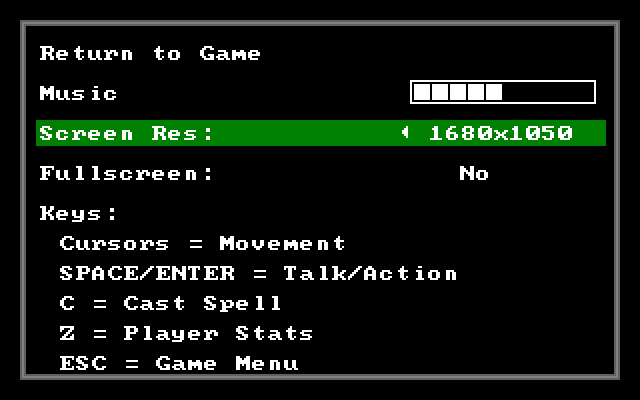
Finally, above is the image of the new in-game options menu. I know, how boring. Of all the things I could possibly take a screen capture of, why that? I promise more exiting images in the future. Truth be told, I focused my efforts the past month almost exclusively on that. Other than displaying the instructions on the bottom, you can toggle screen resolutions and windowed or full screen mode. Believe me, it makes a world of difference when you are playing. Feel free to toggle the music volume. I swear that works, but sadly there are no music files yet. Perhaps in the next alpha release.