
Newest Features of Dark Ages Version 2.0
Ironically, Dark Ages has always been a console style game that required a keyboard and did not support a gamepad. It was very unconsole-like
in that regard. At the time, this was mostly a limitation of trying to support peripherals the average PC user didn’t have in an outdated and
abandoned programming language. I wasn’t going to waste my time doing that. Thankfully, the development libraries available to game
programmers today are much more advanced, to the point that it is probably easier to support gamepads for a basic tile RPG like this one.
When I started the port of DA1, I did it more or less directly; make the gameplay identical to the original. However, under the hood the code
is a bit more dynamic (although still very basic by game design standards - not what I would do when building a new game from scratch). Particularly,
I designed it for different user inputs. With just a few basic system checks and some additional event handlers, gamepads are detected and operate
seamlessly with the keyboard. Mouse will follow shortly, although I wouldn’t recommend it, and that is a topic for a different time. Each action
in the game has a key mapped to it. Simply mapping the gamepad buttons duplicates all functionality. If you have a gamepad, use it at any time.
If you prefer your keyboard, just ignore your gamepad. Both work simultaneously.
One small caveat is there are two specific places where the player is asked to provide text. The most obvious place is when entering the name of the hero at the start of a new game. Keyboard is still required. On a console the standard procedure is to present all the letters of the alphabet in a table, and the gamepad navigates a cursor among those letters to select the next one to use. This is novel to the gamepad and I’m not convinced it is worth the effort for use only twice in the entire game. After all, the game doesn’t run on a console, it runs on your computer, so you SHOULD have a keyboard or equivalent. Tablet owners trying to use their little device like a true computer may disagree, but that was your bad decision. :) Oh well, I suppose I’ll cave eventually and make the alphabet table…
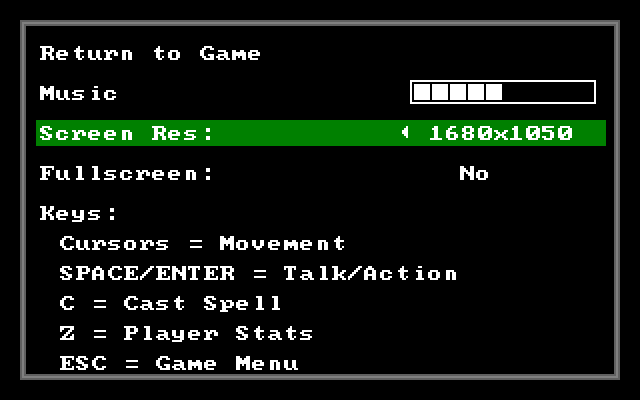
Finally, above is the image of the new in-game options menu. I know, how boring. Of all the things I could possibly take a screen capture of, why that? I promise more exiting images in the future. Truth be told, I focused my efforts the past month almost exclusively on that. Other than displaying the instructions on the bottom, you can toggle screen resolutions and windowed or full screen mode. Believe me, it makes a world of difference when you are playing. Feel free to toggle the music volume. I swear that works, but sadly there are no music files yet. Perhaps in the next alpha release.